- Left-click on any row in the table
- Click on New entry
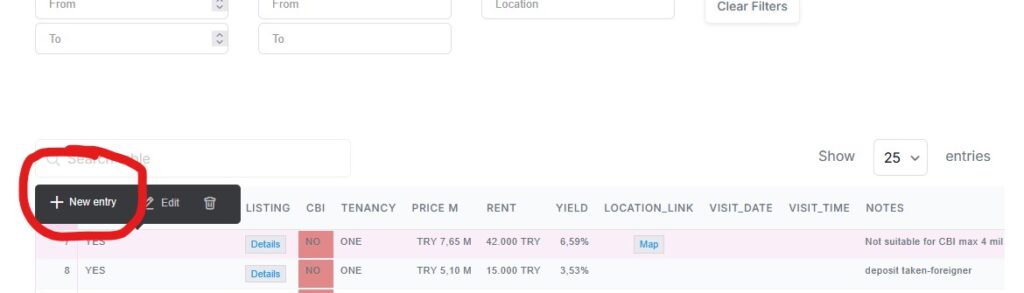
3. Fill in all the information you have at this point. You can always come back to this record later and edit by chosing Edit
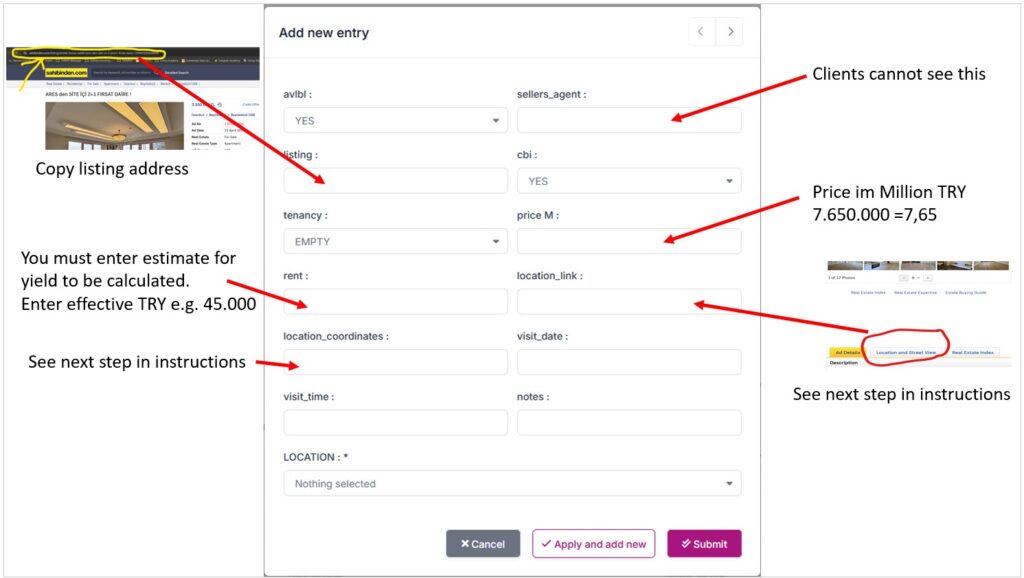
4. For location_link and locations_coordinates go to Sahibinden, scroll down and click on ‘Location’, then ‘get directions’
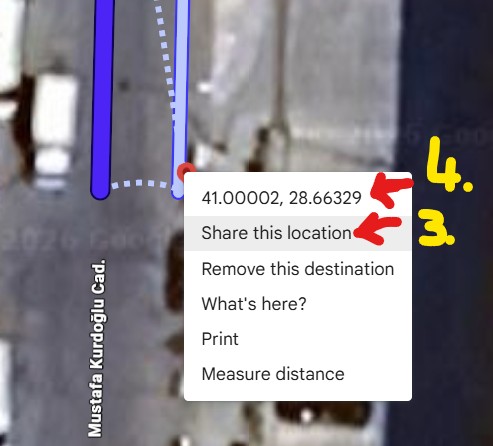
– In Google Maps zoom in as far as possible to location marker
– RIGHT click on the marker
– Still in Google, click on ‘Share this location’, then in the pop up that opens copy the link and paste it into location_link field
– Left-click on the coordinates (this will copy coordinates into clipboard) and paste into location_coordinates field
5. Add visit date and visit time if you have it, or come back to edit and add later
6. Add notes if any. Don’t add CBI information, that is what the CBI field is there
7. Click on Location enter the district in the search box on top, a list of neighborhoods will be filtered. Not all neighborhoods are in the database. If the one you are looking for is not there, select the generic neighborhood.
For example Turkiye>Istanbul>Beyoglu>CAMİİ KEBİR is NOT in the database. So instead select:
Turkiye>Istanbul>Beyoglu>Beyoglu
8. When done, click submit to store the record.